Paper Folder or Digital Album for Object Records?
Choose a paper folder or digital album for object records by matching retrieval habits, document types and family access needs to a system you can sustain.
The common mistake with object records is choosing the tidiest-looking system, then discovering that nobody can find the photograph or note when the object changes hands. A paper folder or digital album for object records works only if it suits the way you look things up and the people who may need the record later.
Neither format is automatically more complete. A folder keeps papers and printed photographs in one physical place; a digital album can bring phone images, scans and typed notes together. The sensible choice depends on whether you reach first for a drawer or a search box, what materials you need to keep, and how the record will remain usable over time.
Which format fits the way you search?
Start with a recent moment when you needed information about an item. Perhaps you wanted to check who gave you a ceramic bowl, compare a label with a photograph, or find a document before passing a cabinet to a relative. The format that would have made that search feel natural is a strong candidate.
Choose a paper folder if you prefer handling documents, recognise an item by its appearance, or routinely file household papers by hand. A clearly marked folder can hold a printed photograph beside a handwritten account, making the connection visible without opening an app or remembering a file name.
Choose a digital album if you already take photographs on a phone, search files on a computer, or need to share records with relatives who live elsewhere. A searchable note can bring up an object by a family name, room, maker’s mark or remembered event, provided those details have been entered consistently.
Choose a hybrid arrangement if the records include both useful originals and digital material, or if different relatives rely on different formats. This does not mean making a duplicate of every scrap: keep the physical papers that matter, then make a digital record of the details someone may need to search or share.
What should the record actually contain?
Before settling on a container, decide what belongs in an object record. A photograph of the front may identify the item, but a second image of the back, base, label or maker’s mark can help distinguish it from a similar object. Add a short description in plain language, including any family name used for it.
Useful supporting material might include a receipt, an old note, a photograph showing the object in a room, or a relative’s account of how it came into the household. Keep observation separate from recollection: “blue enamel pot with a chipped handle” describes what you can see, while “Aunt May said it came from her first flat” records what someone remembers. That distinction leaves room for uncertainty without losing the story.
For paper, use an ordinary folder with a legible label and keep related pages together. Put loose photographs in sleeves made for photographic storage rather than sticking them to a page; adhesive can mark a print and make it difficult to remove. Avoid writing directly on original photographs or documents when a separate caption or sleeve note will do.
For a digital album, give each object a recognisable title and add a short description to the image or album entry. Keep full-resolution photographs of details as well as the overall view, and make scans or photographs of paperwork easy to distinguish from pictures of the object itself. A phone’s built-in photo app may be enough; a shared folder in Google Drive, iCloud Drive or OneDrive can help relatives access files if its sharing settings suit the family.
Which situation sounds most like yours?
What if you often forget where digital files are saved?
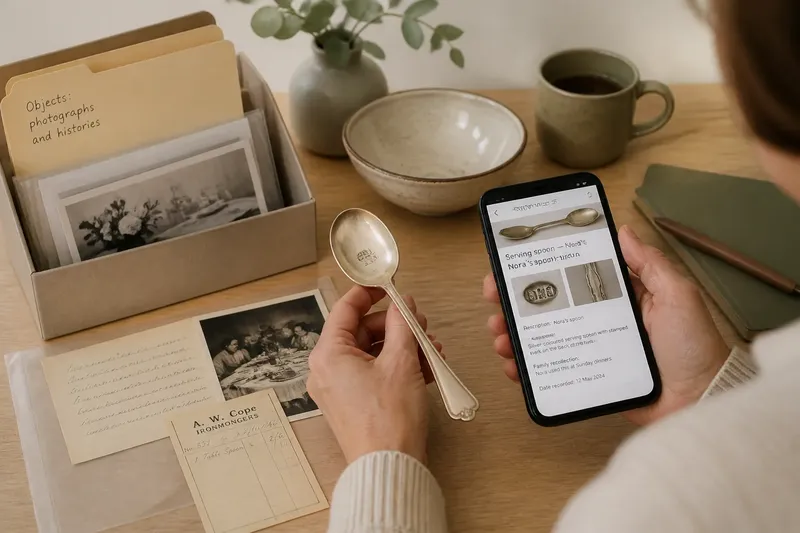
A paper folder may fit better if you already know which cupboard or desk holds household records and tend to search there first. Give it a label that names the contents plainly, such as “Objects: photographs and histories”, rather than a private shorthand only one person understands.
What if you mainly take photographs on a phone?
A digital album is likely to make the initial record easier to keep together, especially when you can add a detail image and a note straight after taking the photograph. Set a recognisable title for each object so the album does not become a stream of unnamed pictures mixed with holiday snaps.
What if relatives need to consult the records?
A shared digital album can suit relatives who live apart, while a folder may be easier for someone who does not use the relevant device or service. Ask the people who will actually consult the records which format they can open and understand, rather than assuming that family access means everyone has the same habits.
What if the papers themselves are part of the story?
Keep important originals in a physical folder, alongside a digital copy when a readable version would help with searching or sharing. The image is a useful access copy, not a reason to discard a document whose annotations, paper, or relationship to the object may matter.
How does retrieval differ in practice?
A paper folder is quick when you know the broad category and the folder is kept in a predictable place. It also lets you see several related pieces at once: a caption, an old photograph and a document can sit together on the table. Its weak point is a search that begins with a vague memory rather than a known label. If the folder is filed under “furniture” but you remember the object as “Grandad’s writing desk”, the relevant record may remain hidden.
Digital search can help with those half-remembered clues, but only when the record contains them. A photo called “IMG_4821” tells a future reader little; a title such as “Oak writing desk, known as Grandad’s desk” offers more routes in. Search also depends on access to the device, account and files, so a record stored in a single person’s private phone album may be harder for the family to retrieve than its owner expects.
Say you have a silver-coloured serving spoon that relatives call “Nora’s spoon”. You create a phone album entry titled “Serving spoon — Nora’s”, add a picture of the stamped mark and type that the name comes from family recollection; the expected result is that a relative searching either “spoon” or “Nora” can locate the entry, while the wording preserves the uncertainty. If the same record lives only on a phone with no shared access, the search may work for you but not for anyone else.
For a paper system, write the family name and a plain object description on the folder’s index sheet, then place the record behind that entry. This small link between remembered name and visible description can prevent the folder from depending on one person’s private knowledge.
What happens when the person keeping the records changes?
Continuity is not simply a matter of choosing paper or digital. A folder can be left in a labelled place, but another person may not know what its headings mean or whether a note is a fact or a family story. A digital album can be shared, but access may depend on an account, a device or permissions that only its creator understands.
Make the system legible to someone who has not helped create it. Use ordinary words for folders, albums and image titles; explain any abbreviations in one place; and identify where the records are kept. If an account is involved, make sure the intended people know how they can access the files and what to do if they cannot.
For either format, keep the object’s record distinct from general family photographs. A picture of a vase at a gathering may be valuable context, but it is easier to recognise as relevant when linked to the vase’s entry by a caption, date note or folder reference. The connection, rather than the format alone, is what helps the next person understand why the image is there.
Where a document or material needs special handling, follow its own care guidance; for other records, keep the system away from obvious household hazards such as spills and avoidable heat. A digital copy can make information easier to consult, but it does not replace sensible care of an original that matters.
How can you keep either system usable?
Choose a naming approach you can maintain rather than a detailed catalogue that becomes a chore. For each item, a useful minimum is:
- A plain description that distinguishes the object from similar things.
- A clear photograph of the whole object, with close views of marks or labels where relevant.
- The source of any story or identification, such as a named relative or an old note.
- A place for related documents, whether a folder pocket or a digital file entry.
- A brief note explaining where the record is kept and who can consult it.
Review the arrangement when an object is moved, passed to someone else, or identified more clearly. Update the record without quietly erasing an earlier uncertainty: if a family account changes, note that the account was revised and retain the earlier wording when it helps explain the object’s history.
For digital records, keep copies somewhere beyond the one device used to create them, using a storage option you understand and can access. For paper, make the folder’s location obvious to the people who may need it and return records to the same place after use. A system that depends on perfect memory is fragile in either medium.
So, should you choose paper, digital or both?
Choose a paper folder if physical papers, printed pictures and familiar filing habits matter most to you. It is a good fit when the records will usually be consulted in the home and the folder can stay in a known place.
Choose a digital album if photographs are already being made on a phone, names and details are useful search terms, or relatives need to see records from elsewhere. It suits readers willing to keep file names and access arrangements clear.
Choose both when originals need a physical home but searchable images and notes would make the collection easier to use. Keep the arrangement modest: physical originals in the folder, with digital copies of the items that benefit from quick search or sharing.
The best paper folder or digital album for object records is the one another person can interpret without asking you to decode it. Write down the names people use, distinguish what you can see from what you have been told, and make the location or access route plain. That small act of clarity gives an object’s record a better chance of remaining useful after its keeper changes.